Posts

Caching Rendering HTML when conditional rules are applied
Image
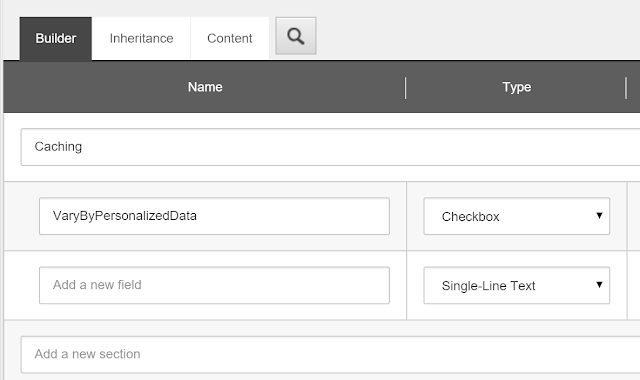
Applying Sitecore caching is an essential task when you build your site, It help improve your site general performance and decrease response time significantly , Output HTML cache is one of the different types of cache that Sitecore offers, I almost apply it everywhere on site rendering components. However, If you are applying Conditional rendering on a component (Personalization) and you are setting different datasources based on some conditions, Applying Caching on that Component with " Vary by Data " option checked will not work as expected, At first i thought that Sitecore will resolve Component datasource by applying the Conditional rules before adding that to the " Cache Key",  That was not the case :( . It turned out that Sitecore uses the default datasource applied on the component to generate the Cache Key, So you will always see the " Default " version of the component on the page, And all of Conditional rules will be ignored. I'm usin...

Solr with Sitecore Checklist

Image
We have been using Solr with Sitecore for our latest Sitecore implementations as it offers better index synchronization across all CD/CM servers since its a standalone web app with HTTP access, which means that all CD/CM servers will have up-to-date indexed content, unlike lucene where each Sitecore server is responsible of synchronizing its lucene index, which sometimes breaks and causes content to be out-dated. This blog is not about how to configure Solr with Sitecore, there are many blogs talking on this subject, This blog is about some considerations and best practices that you need to take into account when you setup Solr with Sitecore.     First, Disable Indexing on CD's With Solr/Sitecore setup, you only need to enable indexing on CM, and disable it on CD servers, By default after any publish operation, Sitecore will store (item changed/added) event into Event Queue table, and each Sitecore instance will pick that and trigger index job for that item, W...

Set Workflow using Item Buckets Search Operations

Image
Recently one of our clients asked to set the workflow on large number of items that were created without workflow, so i was thinking of writing a script on powershell to do that, but then i thought why not extend Item buckets Search operation and add "Set Workflow" option there! Basically, You will need to write a command that sets the workflow for all items in search results, and register that command. 1- The Code: 2- The Configurations: <configuration xmlns:patch="http://www.sitecore.net/xmlconfig/">   <sitecore>     <commands>       <command name="bucket:setworkflow" type="Sitecore.SharedSource.Buckets.SearchOperations.SetWorkflow, Sitecore.SharedSource.Buckets.SearchOperations"/>     </commands>   </sitecore> </configuration> 3- Adding Command item in Sitecore:  Open Content Editor and go to " /sitecore/system/Settings/Buckets/Settings/Search Operations/Fiel...

Adding custom properties to Social Connected users profile

Social Connected module gives the ability for website users to register through their social networks, like Facebook, Twitter, Linkedin and Google+, the module does a good job of mapping users data from these networks and add them to user profile in sitecore. Recently, we needed to add our own custom properties into users registered through Social networks, i was able to do this by using [social:connector:user:created] event. The following code grabs the user object from event parameters, and update the profile with our own custom property: namespace Sitecore.SharedSource.Events.Social {     public class UserCreated     {         protected void UpdateUserProfile(object sender,  EventArgs args)         {             var user = Sitecore.Events.Event.ExtractParameter(args, 0) as Sitecore.Security.Accounts.User;   ...

Convert item to bucket item programmatically

Item buckets lets you store millions of items in a repository without having a direct parent-child relationship, which solves the problem of having large number of items in content tree. Any item in sitecore can be converted into item bucket from Content Editor, by going to ' Configure ' tab then clicking ' Bucket ' to convert the item into item bucket. I was able to write some helper methods to conver item to Item bucket programmatically , in case you were importing large number of data and you wanted to covert items into buckets on the fly. public static void ConvertToBucketItem(Item item)     {         using (new SecurityDisabler())         {               Sitecore.Buckets.Managers.BucketManager.CreateBucket(item);             using (new Sitecore.Data.Items.EditContext(it...

Integrating Lucene.Net.Contrib.Spatial with Sitecore Search API (Geo-Spatial Search)

Image
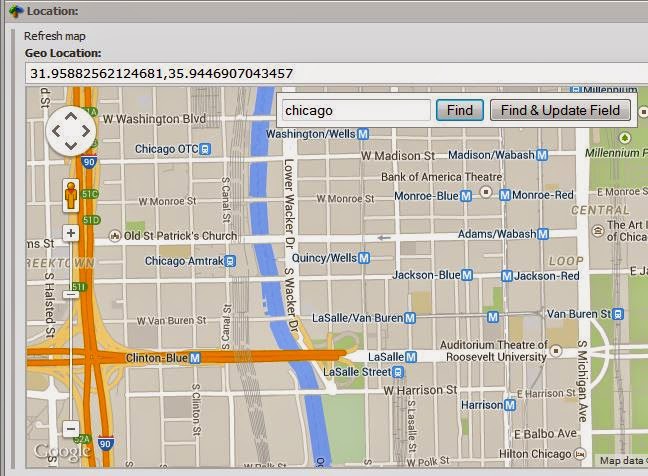
Note : Newer release is published on github  that support sitecore 8.1 & 8.2 and fixes the issue with location results being cached, Go to this post to read about the details of the new release I have created an Extension to Sitecore.ContentSearch API which uses Lucene.Net.Contrib.Spatial library to generate spatial queries. Currently, i added a method " WithinRadius() " to retrieve locations within specific radius (In miles) of center point , the results will be sorted based the distance from the center point. This extension assumes that you have Latitude and Longitude stored as fields in your location items. Installation :  You can either get the source from github or install nuget package.     Marketplace : Go to Sitecore Marketplace and download "Lucene Spatial Search Support" package. Install the package using Sitecore Installer wizard Configurations : Go to ' Sitecore.ContentSearch.Spatial.config ' file in your include fol...

Disable caching for a rendering on some pages

Everyone loves Sitecore caching capabilities, especially HTML Caching, where you can cache the output HTML of any  rendering. When you want to cache any rendering, you have two options: On rendering definition item, Set 'Cacheable' checkbox  On item presentation details, Select your rendering and set 'Cacheable' checkbox. The problem with the first approach is that once you set the 'Cacheable' option on definition item, any page that uses this rendering will always cache it, and you can't cancel the caching for that rendering on some pages that you dont want it to be cached there. I found a solution for this, where you can disable any caching setting for any rendering, :  Create a new rendering parameters template which includes a checkbox field called "Cancel Cache Settings' Go to your rendering definition item, and set the parameter template to the new template If your site runs on Sitecore MVC, Do the following Create a class call...